Run on the beat. Walk when it tells you.
Stride Metronome is a cadence metronome and a run/walk timer in one iPhone app. Set your steps per minute and your intervals, put the phone in your pocket and go. It'll tell you when to run and when to walk, and the tick keeps going over your music the whole way.
Features
A tick that keeps time
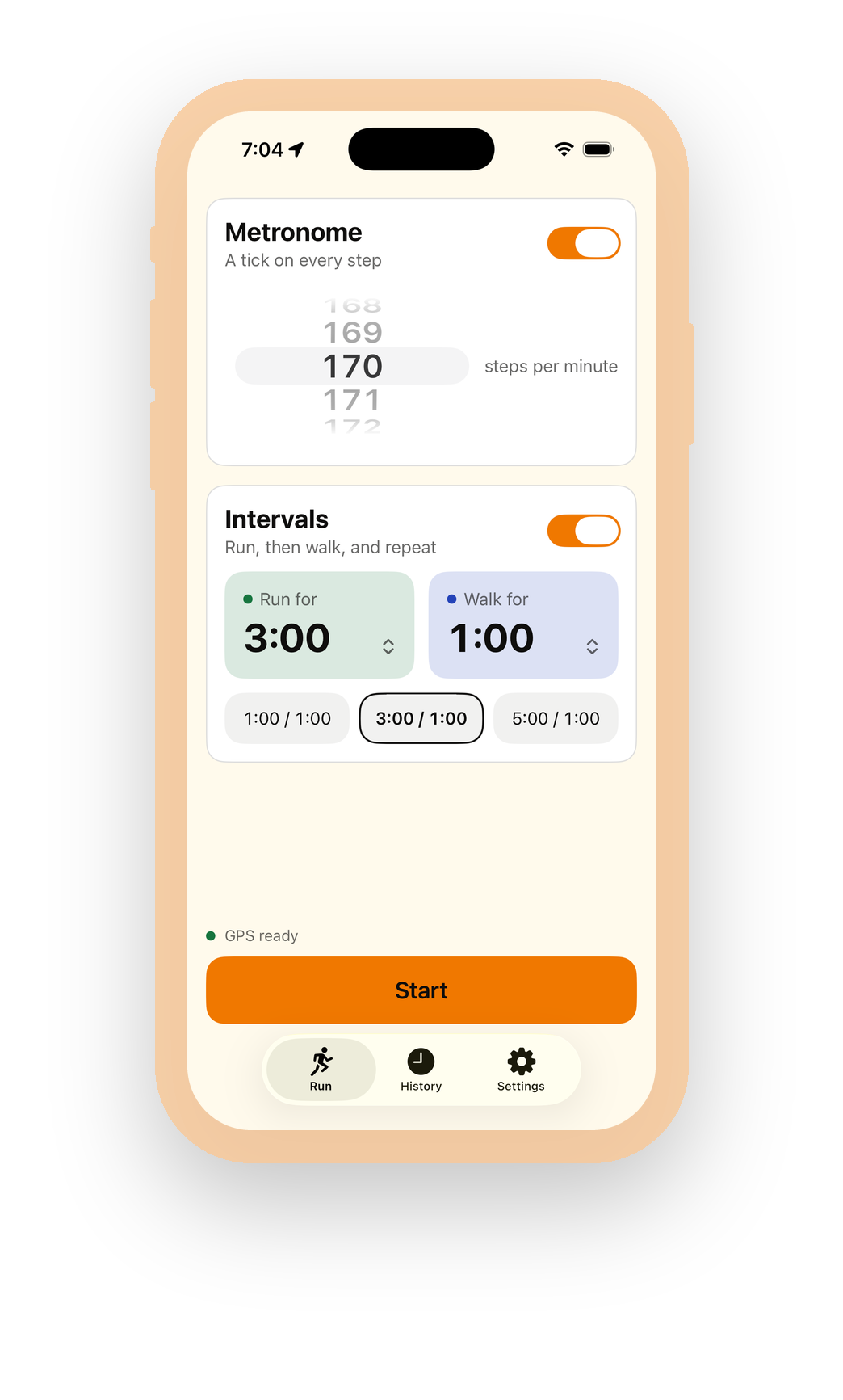
Pick any cadence from 120 to 220 steps per minute. The tick holds that tempo for the whole run and plays over your music without turning it down.
Run, walk, repeat
Set a run time and a walk time, or tap a preset. It switches back and forth until you decide you're done. There's no interval count and no finish line.
Hear it and feel it
A voice says "Start running" or "Start walking" at every switch, and the phone buzzes so you feel it too. Your podcast drops for a second and then comes right back.
Nothing leaves your phone
No account, no ads, no tracking. Your runs, routes and settings are kept on your phone and nowhere else.
How it works
Setting it up takes about as long as putting your headphones in.
01
Set it up
Choose your cadence and your run and walk times. The app remembers them for next time. Meanwhile it's finding a GPS signal, so wait until it says "GPS ready".
02
Put the phone away
Tap Start, listen for "3, 2, 1" and lock the phone. Land your feet on the tick until the voice tells you to walk.
03
Look back on it later
When you're done, hold Stop and save. The run goes into History with your route, distance, pace and every run and walk segment.
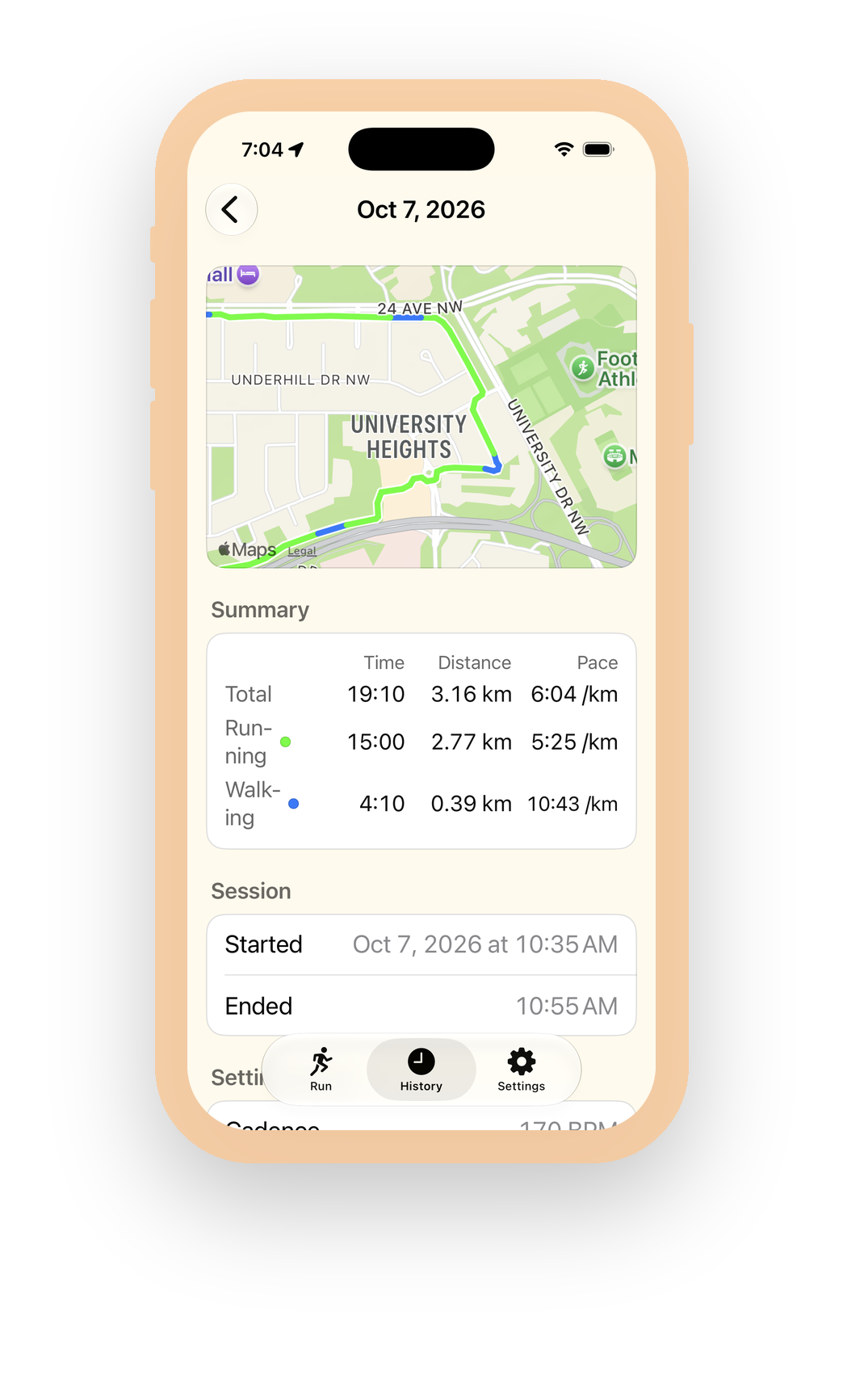
Run Workout Summary
Every run you save gets its own page. There's a map of your route with the running and walking parts in different colours. You also get your time, distance and average pace, for the whole run and for the running and walking separately. It keeps the cadence and intervals you used too, which is handy if anyone asks what you did.


Set the Cadence Metronome and Your Run/Walk Times
Scroll the wheel to your cadence. Then set how long to run and how long to walk, in 5-second steps. Three presets cover most plans: 1:00/1:00, 3:00/1:00 and 5:00/1:00. If you don't know your cadence yet, start a little quicker than your natural one; the FAQ shows how to find it. Only want one of the two? Turn the other off. Turn both off and you've got a plain run tracker.
Easy Metrics While Running and Walking
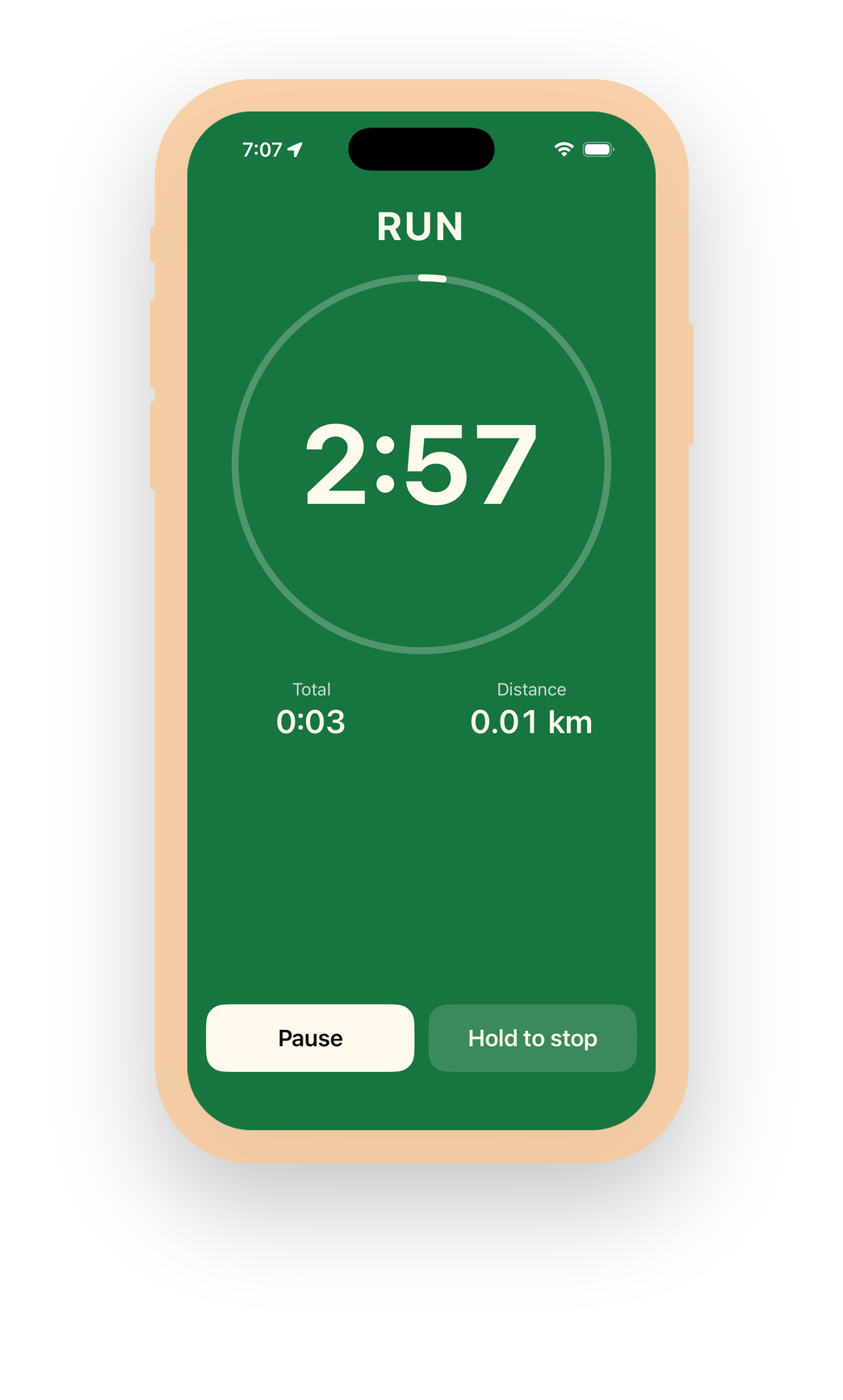
The screen goes green when you're running, blue when you're walking and orange during the countdown, so you can tell where you are from arm's length. The time left in the segment is in big numbers, with your total time and distance under it. On most runs you won't need to look at all.
History Stored on Your Phone
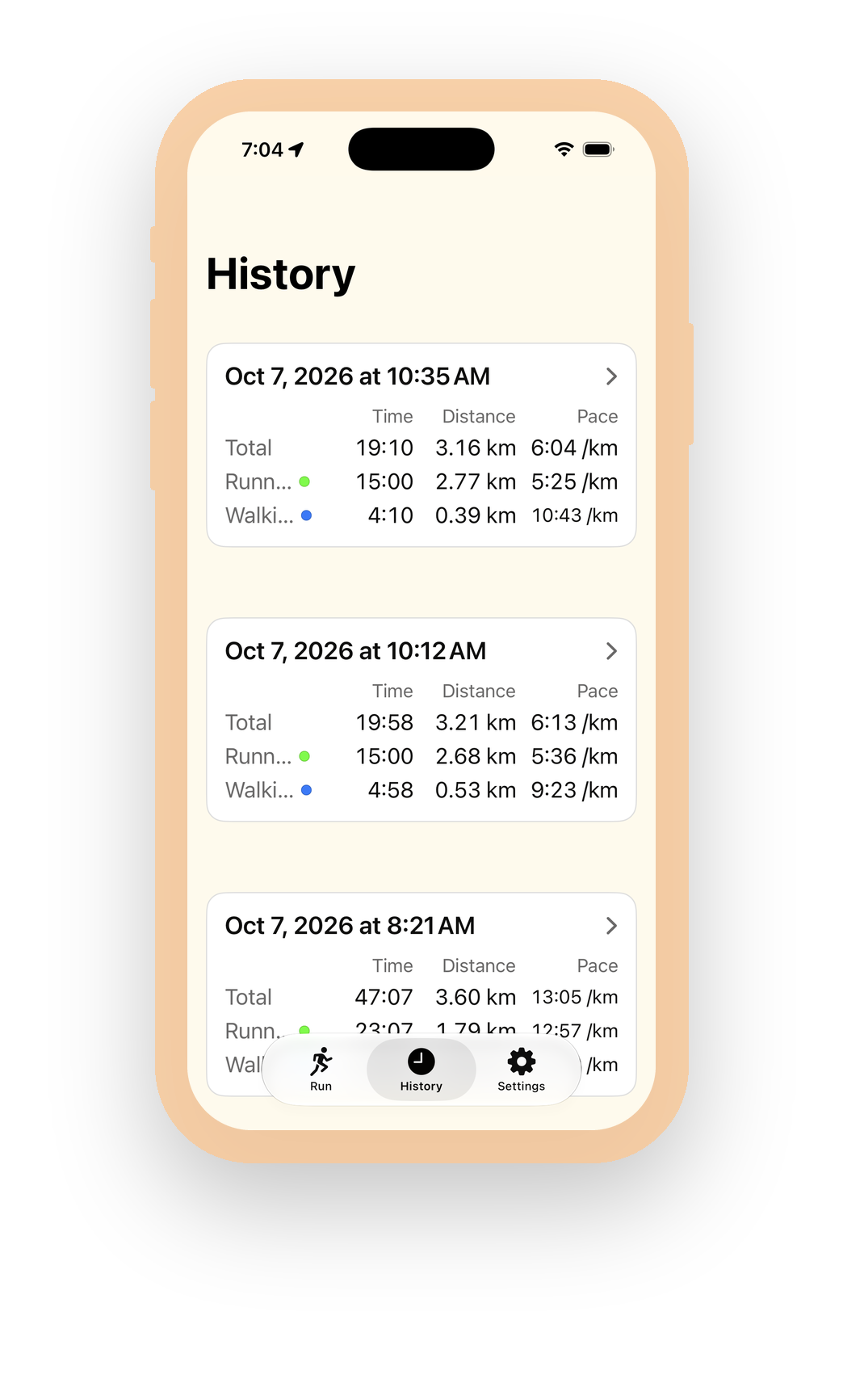
Every saved run is listed with its date, time, distance and pace, newest first. Tap one to see the whole session, or swipe to delete it. If the app closes or your phone dies halfway round, the run is still there, because it saves every 30 seconds.
See Data on Your Running and Walking Segments
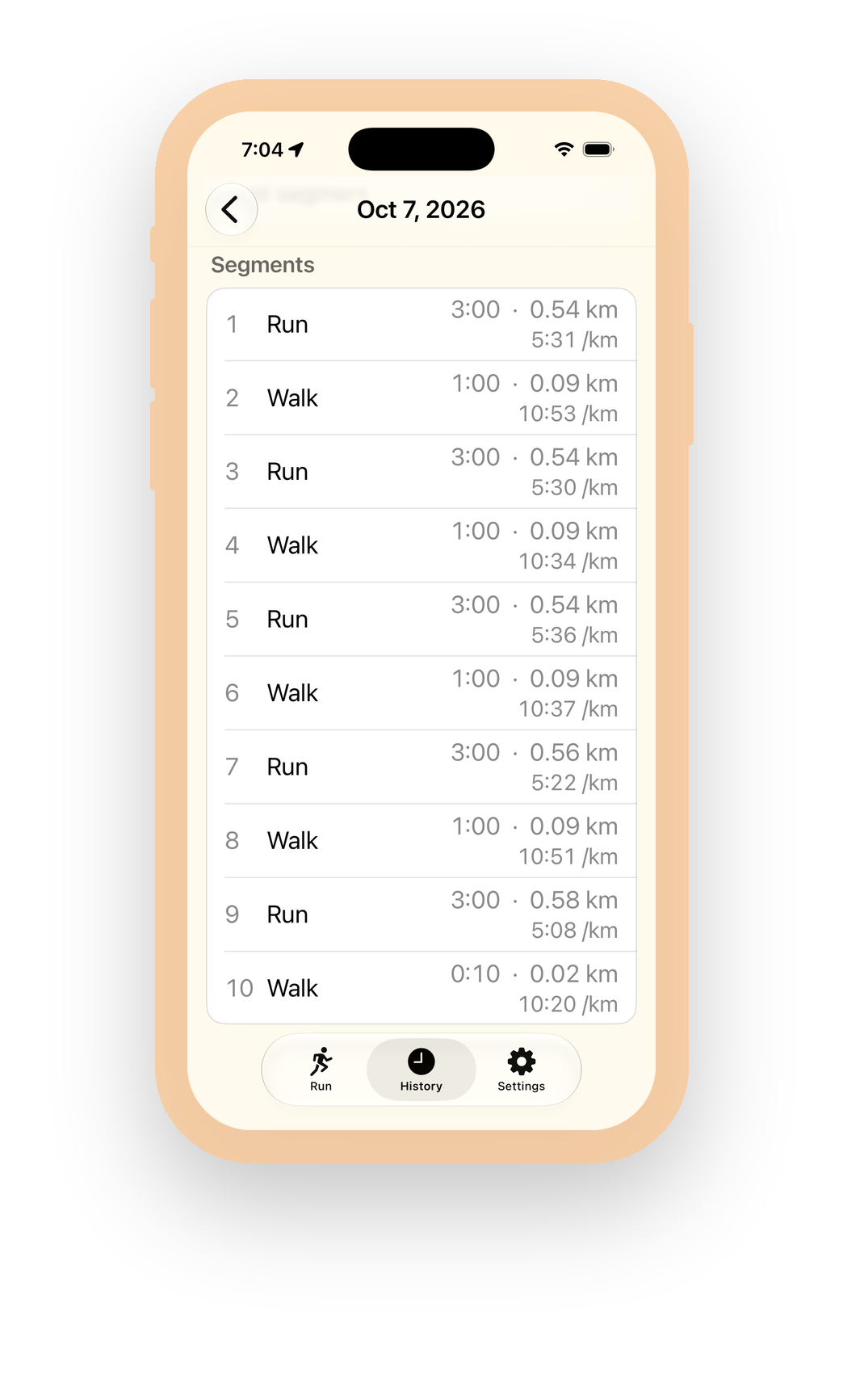
Every run and walk segment is listed on its own, with its own time, distance and pace. You can see whether you faded towards the end, or how your walk breaks are changing over a few weeks. If you're following a physio's plan, it's also a record of exactly what you did.
Control is in Your Hand
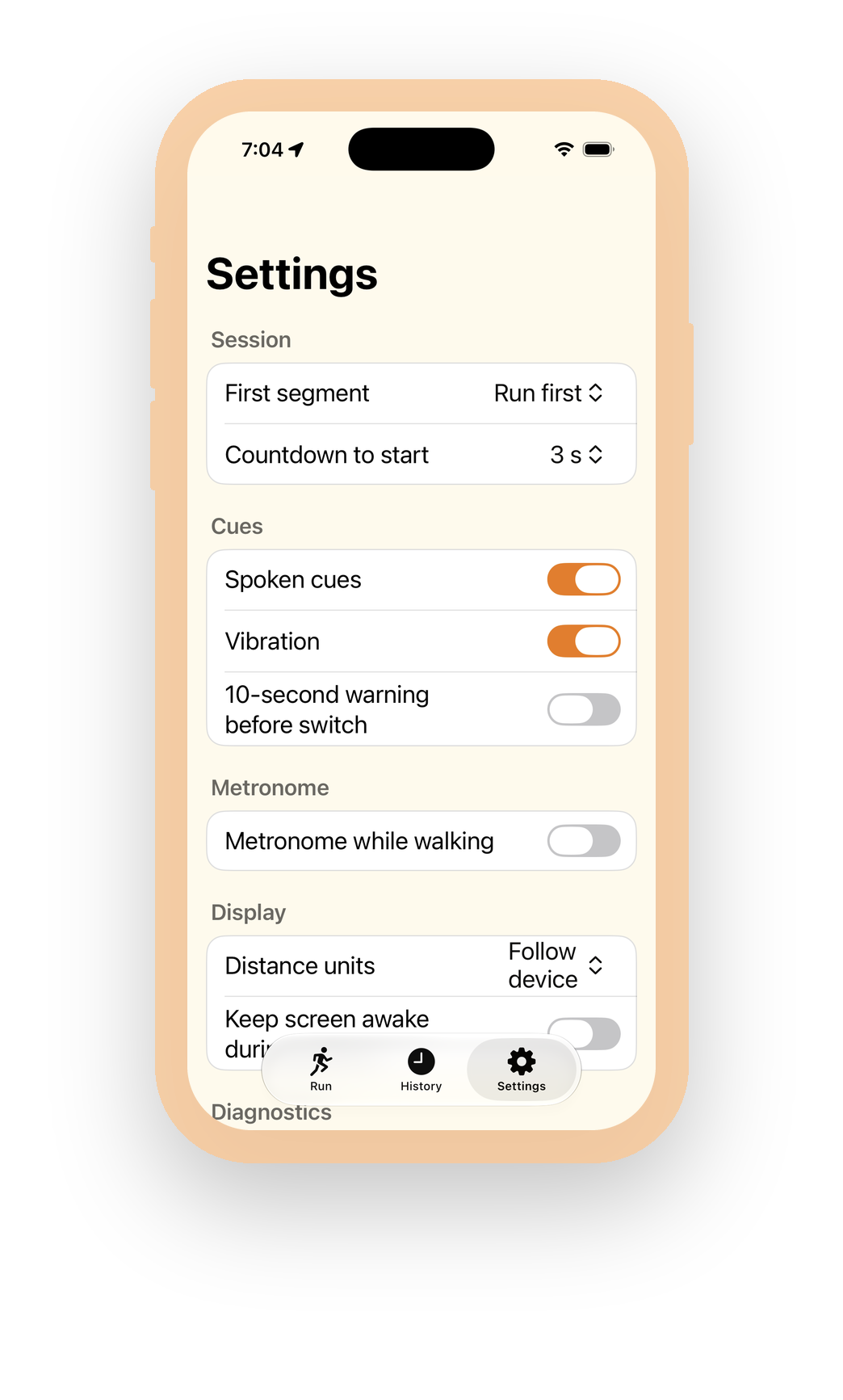
Run first or walk first. A 3, 5 or 10 second countdown, or none at all. Spoken cues, vibration and a 10-second warning before each switch can each be turned on or off. Kilometres or miles. You can also keep the tick going during walk breaks at a slower walking cadence, though most people leave that off.
About Stride Metronome
What does Stride Metronome do?
It's a metronome and a run/walk timer in one app. The metronome ticks at whatever cadence you set so you can match your steps to it. The timer tells you when to run and when to walk. Use both or just one. It also tracks your distance and route.
Does it work with the screen locked and the phone in my pocket?
Yes. Hit Start, lock the phone, put it away. Everything keeps running until you stop it.
Can I listen to music or a podcast at the same time?
Yes. The tick plays right over top of it. Your music gets quieter for a second when the app says "run" or "walk", then comes back.
Does it work on Apple Watch or Android?
iPhone only right now. We'd like to do an Apple Watch version. Android isn't planned.
What happens to my data?
Nothing. It never leaves your phone. There's no account to create and we don't run a server. Location is only used while you're in a session. More in the Privacy Policy if you want the details.
Cadence
What is running cadence, and why does it matter?
It's your steps per minute. When you take quicker steps your stride gets shorter and your foot lands under you instead of way out front. That's easier on your knees, hips and shins. It's often the first thing a physio will change if you show up with knee or shin pain.
What cadence should I set?
Go for an easy run, count your steps for 30 seconds and double it. That's your cadence. Most people are somewhere between 155 and 175.
Then set the metronome about 5% higher. So if you counted 160, set it to 168.
You'll hear people say 180 is the number. It's a fine goal for a lot of runners, but don't jump straight to it. Going from 160 to 180 overnight feels awful and you won't keep it up. Bump it a few steps at a time and give yourself a couple of weeks at each level.
Does my cadence change with speed?
A bit. It goes up when you run faster and drops on hills or when you're tired. That's normal. The tick just makes it obvious when you've drifted.
What is "Metronome while walking"?
Normally the tick stops during walk breaks. If you'd like it to keep going, turn this on in Settings and pick a walking cadence. Some people like it because it stops them from dawdling. Lots of people leave it off.
Run and Walk Intervals
Why run and walk instead of just running?
Because you can go further and it hurts less. Taking a walk break before you're wiped out means your form holds up for the whole run. It's how most beginners should start, and it's how a lot of people come back from injury. Experienced runners use it for long runs too. People finish marathons this way.
What intervals should I use?
Pick a run time you could do several times in a row without being out of breath. Some places to start:
New to running: run 0:30, walk 1:00. Or 1:00 and 1:00.
Building up: run 2:00 or 3:00, walk 1:00.
Long runs: run 5:00 to 10:00, walk 1:00.
Coming back from injury: use what your physio or doctor gave you, even if it feels too short.
Only change one thing at a time, and only after the current setup has felt easy for a week or two. There are presets for 1:00/1:00, 3:00/1:00 and 5:00/1:00, or you can set your own in 5-second steps.
Is there a total time or a number of intervals?
No. It keeps alternating until you hit Stop. Run as long as you feel like.
Who it is for
I have never run before. Where do I start?
Mostly walking. Set it to run 0:30, walk 1:00, and go out for 20 minutes, three times a week. Leave the metronome on at a cadence that feels comfortable.
When that's easy, change the run to 1:00. Keep going like that, a little at a time. You should finish feeling like you had more in you. Don't worry about pace at all.
I am learning to run properly. How does the metronome help?
It's really hard to think about your form while you're running. Cadence is the shortcut. Step on the tick and your stride shortens and your landing gets softer on its own, without you having to think about either.
Give it a few weeks. After that you'll find you hold the cadence without the tick, and you can just turn it on once in a while to check.
I am running with an injury, or coming back from one.
See your doctor or physio first. Please don't use an app to work around an injury nobody has looked at.
Once you're cleared to run, there's a good chance they'll put you on run/walk intervals and ask you to raise your cadence. That's what this app does. If the pain gets worse during a run, stop, and let them know.
My physiotherapist has given me a run-walk program. Can I use the app for it?
Yes. This is a big part of why we made it. Put in the run and walk times they gave you, set the cadence if they gave you one, and go. You don't have to watch a clock.
Every session is saved in History with the settings you used, so you can show them what you did at your next appointment.
I already run. Can it help me go further?
It can. Try walking for a minute every five or ten minutes on your long run. A lot of runners find they can go further that way and feel better the next day. You lose less time than you'd think, because you're not fading at the end.
Headphones and AirPods
Which headphones work best?
Anything works, including the phone speaker. Wired headphones are the steadiest. Bluetooth and AirPods are fine too, with one quirk (next question).
Sometimes the tick seems to speed up or slow down for a few seconds with AirPods. Why?
That's Bluetooth. Wireless earbuds buffer a bit of audio and every so often they play it slightly fast or slow to stay synced with the phone. You'd never notice it in a song. With a metronome you do.
You'll mostly hear it in the first minute or two after the earbuds connect, or when the signal is weak. The phone's timing is fine the whole time. We've measured it.
Two things help. Connect your AirPods before you tap Start. And keep the phone in a front pocket or an armband, because a back pocket puts your body between the phone and the earbuds.
What if my headphones disconnect mid-run?
The sound switches to the phone speaker and the session carries on. It switches back when they reconnect.
What happens if I get a phone call?
The sound pauses but the timer doesn't. When you hang up, you're wherever you would have been in the intervals anyway.
GPS and Distance
How accurate is the distance?
It depends on your phone's GPS. On open roads it's usually within a few percent. Trees and tall buildings make it worse, and so does starting before the GPS has locked on. Wait until the Run screen says "GPS ready".
Why does it ask for my location?
For distance and the route map. That's all, and only during a session. You can say no and the metronome and intervals will still work. You just won't get distance or a map.
Can I use miles instead of kilometres?
Yes. It goes by your phone's region to start with. Change it in Settings.
How much battery does it use?
About what you'd expect from a running app with GPS. If you start with a reasonable charge you'll be fine for a long run. The "keep screen awake" option uses a lot more, which is why it's off by default.
Troubleshooting
I cannot hear the tick or the voice.
Check your volume and the ring/silent switch first. Then check that Metronome and Spoken cues are turned on.
If you can hear the voice but not the tick, you're probably in a walk break. The tick is off during walks unless you've turned on Metronome while walking.
The vibration does not always happen.
Yeah, that's an iPhone thing. It doesn't always let apps vibrate when the phone is locked in a pocket, and it's different from model to model. Go by the voice. The vibration is a bonus.
The app was closed during a run. Is the run lost?
No. It saves every 30 seconds while you're running. Open the app again and the run will be in History, up to the last save.
How do I report a problem?
Email us through the contact us sectionin the app settings. If it's about the tick or the cues, there's a Share diagnostics log button in Settings. Send that along too. It makes it much easier for us to figure out what happened.